






Ontario Medical Supply
Automating 100% of Online Order Transfers to Pronto ERP
- Automated order transfer from Adobe Commerce to Pronto ERP in 10–20 seconds.
- Delivered customer-specific catalogues, pricing, and stock synchronization.
- Simplified bulk ordering through SKU entry and CSV uploads.

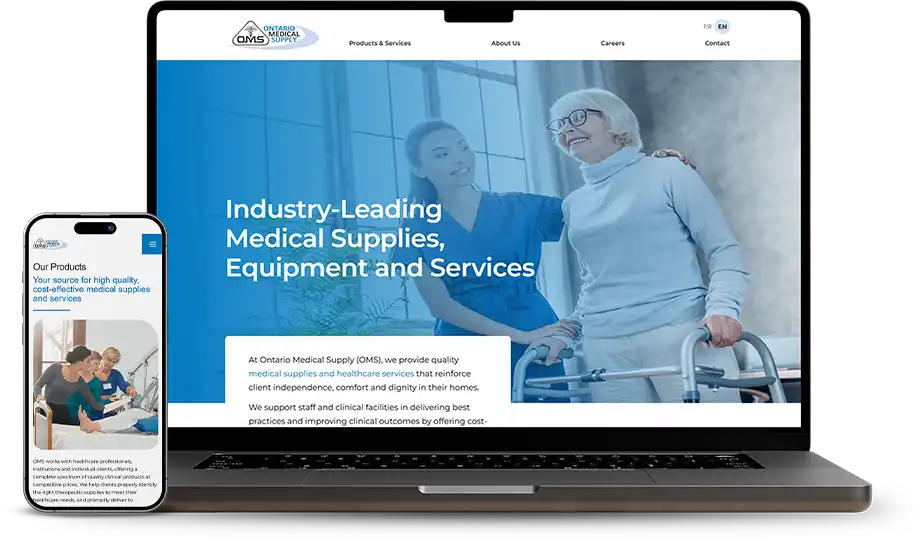


Project
Ontario Medical Supply
Niche
Medical Supply Distribution
Industry
Healthcare Supply and Distribution
Technology
WordPress, Adobe Commerce (Magento)
About Ontario Medical Supply
Ontario Medical Supply (OMS) is a Canadian distributor of medical equipment, clinical supplies, and home healthcare products. It serves healthcare organizations, medical professionals, care facilities, and individuals who rely on access to essential medical products. Its broad product range supports different care settings, from clinical environments to home-based care.
Kinex Media developed a B2B ordering portal on Adobe Commerce (Magento) 2.4.7 B2B, integrated with Pronto ERP to address manual order entry and complex customer-specific purchasing requirements. The backend automates order transfers, synchronizes negotiated pricing and stock, and restricts product catalogues according to customer eligibility. ERP confirmations update orders with their Pronto order numbers, while failed synchronization triggers email alerts. Features such as SKU-based quick ordering and CSV uploads further simplify bulk purchasing for business customers.
Services
Key Challenges Ontario Medical Supply Faced


Manual ERP Order Entry
Online orders had to be entered into Pronto ERP manually, adding work for the operations team and creating opportunities for data-entry errors and processing delays.
Complex Customer-Specific Pricing
Business customers had different negotiated prices and product purchasing permissions. Maintaining accurate pricing, stock information, and eligible product catalogues across customer groups required reliable ERP synchronization.
Limited Order Status Visibility
The team lacked a straightforward way to confirm whether online orders had reached Pronto ERP. Failed transfers could go unnoticed, making order follow-up harder and leaving staff without clear confirmation of order processing.
Backend Solutions We Provided
Automated ERP Order Synchronization
Customer-Specific Catalogues and Pricing
Faster Bulk Ordering
Dedicated B2B Purchasing Tools
Order Monitoring and Platform Reliability
We integrated Adobe Commerce with Pronto ERP to automate the transfer of online orders and eliminate manual order entry. Orders are sent to the ERP approximately 10–20 seconds after checkout. Once Pronto confirms an order, its unique order number is saved against the corresponding order, giving the team a clear reference for processing and follow-up. Customers also receive confirmation emails after successful synchronization. To help the operations team identify problems promptly, the integration triggers email alerts when an order fails to sync. This creates a more traceable workflow between online purchasing and ERP order processing.
Delivered Results
ERP Integration & Automation
- 100% of online orders transferred to Pronto ERP automatically.
- Zero manual order entry required for online orders.
- Orders reached the ERP approximately 10–20 seconds after checkout.
- Customer-group pricing and stock information synchronized every 5 minutes.
- Improved mobile usability score from 54 to 93 on UX audits.
- Every successfully synced order received a unique Pronto order number.
B2B Ordering & Operations:
- 3,500+ order records processed through the platform.
- Customer-specific catalogues and pricing supported account-level purchasing requirements.









Aaron Crangle



I used Kinex Media to build my website and handle my SEO, and they have been terrific. Amir is responsive to all my questions, and the team delivers on what they promise. I highly recommend Kinex Media.
















Get Your Free Growth Plan in 24 Hours
Award
Winning Agency
Performance
Focused Strategies
Seamless
Project Delivery
Proudly Recognized by Top Brands



Rather talk now?